Tags: Pluto

Remote Tank Level Monitoring Using a 4–20 mA Level Transmitter

Remote Tank Level Monitoring Using a 4–20 mA Level Transmitter

MEI 20/10/2026 0
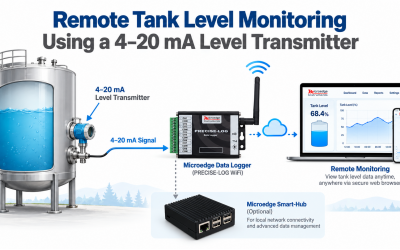
Tank level is commonly measured with pressure, hydrostatic, ultrasonic, or other level transmitters that provide a 4–20 mA output. By connecting the transmitter to a Microedge current-input data logger, the level can be recorded continuously, converted into engineering units, and monitored locally or remotely.This Application Note shows a typical system for monitoring tank level using a 4–20 mA transmitter.  1. Application Consider a storage tank where the liquid level must be monitored continuously.Instead of checking the tank manually, a 4–20 mA level transmitter measures the liquid level and sends the signal to a data logger.A typical system consists of:Level Transmitter → 4–20 mA → Data Logger → PC / Network → Monitoring SoftwareThe system can provide:Continuous level recordingReal-time level displayHistorical graphsEngineering-unit conversionRemote monitoringAlarm monitoring when used with supported software and system configurations  2. Typical Measurement System A common two-wire 4–20 mA transmitter requires an external DC power supply.A typical loop is:24 VDC Power Supply (+) → 4–20 mA Level Transmitter → Microedge Current Input → 24 VDC Power Supply (−)The transmitter cont...
Read More
Product Relase - Pluto

Product Relase - Pluto

MEI 30/10/2020 0
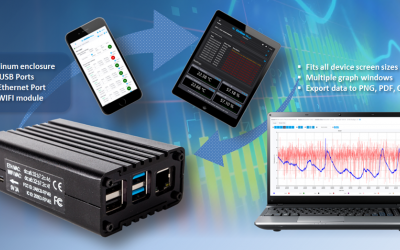
We are pleased to announce the launch of our new product - Pluto, the webserver hardware!Pluto is a Web Server hardware box providing a data logging system that can be accessed remotely from web browsers.Adding a data logger to the system is as simple as plugging it into one of the four on-board USB ports or creating connections to bring other remote data loggers to the system.  Besides the pre-defined pages for device view, graph view, real-time view etc., Pluto allows adding unlimited custom web pages from which you can easily drag & drop user controls on, such as real-time reading, alarm status, label etc.Just plug Pluto into your Ethernet port and enjoy viewing and managing the system from your web browser. If you don’t have a cable network, no problem, Pluto has a WIFI module that can be used to connect to your local network wirelessly. ...

Read More