All products shipped from Canada to the United States by Microedge Instruments qualify for duty‑free treatment under USMCA/CUSMA.   DETAILS

Tags: Ethernet

PLC and SCADA Integration of USB Data Loggers Using Smart-Hub

PLC and SCADA Integration of USB Data Loggers Using Smart-Hub

MEI 21/10/2026 0
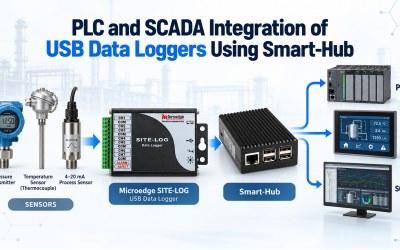
PLC and SCADA Integration of USB Data Loggers Using Smart-Hub Many industrial monitoring systems already use PLCs, HMIs, or SCADA software as the main supervisory platform. At the same time, standalone USB data loggers may already be installed for temperature, voltage, current, humidity, pulse, state, or other measurements.Microedge Smart-Hub provides a practical way to connect supported USB data loggers to an Ethernet network and make their real-time measurements available to industrial systems through Modbus TCP.This Application Note shows how a USB data logger can be integrated into a PLC or SCADA system using Smart-Hub as a communication gateway.  1. Application A typical application may already include one or more USB data loggers installed close to sensors or equipment.Examples include:Temperature monitoring4–20 mA process transmittersVoltage monitoringRelative humidityEquipment state monitoringPulse or event countingLaboratory or test-system measurementsThe customer may want these measurements to become available to an existing:PLCHMISCADA systemIndustrial PCBuilding-management systemCustom Modbus TCP applicationInstead of replacing the USB data loggers, they can be connecte...

Read More
USB, WiFi, Ethernet, REST API or Modbus TCP: Choosing the Right Data Logger Communication Method

USB, WiFi, Ethernet, REST API or Modbus TCP: Choosing the Right Data Logger Communication Method

MEI 19/10/2026 0
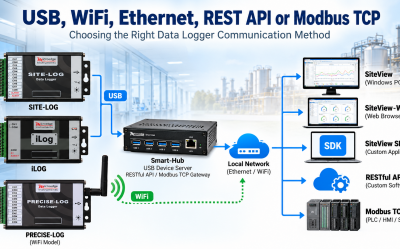
  Modern data loggers can communicate through USB, WiFi, Ethernet, RESTful Web API, and Modbus TCP. These methods serve different purposes, so the best choice depends on how the logger will be used.A simple way to decide is to ask:Is the logger used locally or remotely?Does a person, custom application, or industrial control system need the data?Do you need historical recorded data, real-time readings, or both?  USB: Simple Local Connection USB is the simplest option when the data logger is located near a Windows PC.Typical connection:Data Logger → USB → SiteViewUSB is well suited for:Logger configurationData downloadReal-time monitoringLaboratory testingShort-term experimentsFor many standalone logging applications, USB is all that is required.  Smart-Hub: Put USB Data Loggers on the Network A USB data logger can also be accessed remotely by connecting it to a Microedge Smart-Hub.Typical architecture:USB Data Logger → Smart-Hub → Ethernet NetworkSmart-Hub provides three main functions:USB Device ServerRESTful Web APIModbus TCP GatewayThrough its USB Device Server function, supported loggers can be accessed by:SiteViewSiteView-Web / PlutoSiteView SDKThis allows existing USB-based S...
Read More