MENU
Many industrial monitoring systems already use PLCs, HMIs, or SCADA software as the main supervisory platform. At the same time, standalone USB data loggers may already be installed for temperature, voltage, current, humidity, pulse, state, or other measurements.
Microedge Smart-Hub provides a practical way to connect supported USB data loggers to an Ethernet network and make their real-time measurements available to industrial systems through Modbus TCP.
This Application Note shows how a USB data logger can be integrated into a PLC or SCADA system using Smart-Hub as a communication gateway.
A typical application may already include one or more USB data loggers installed close to sensors or equipment.
Examples include:
The customer may want these measurements to become available to an existing:
Instead of replacing the USB data loggers, they can be connected to Smart-Hub.
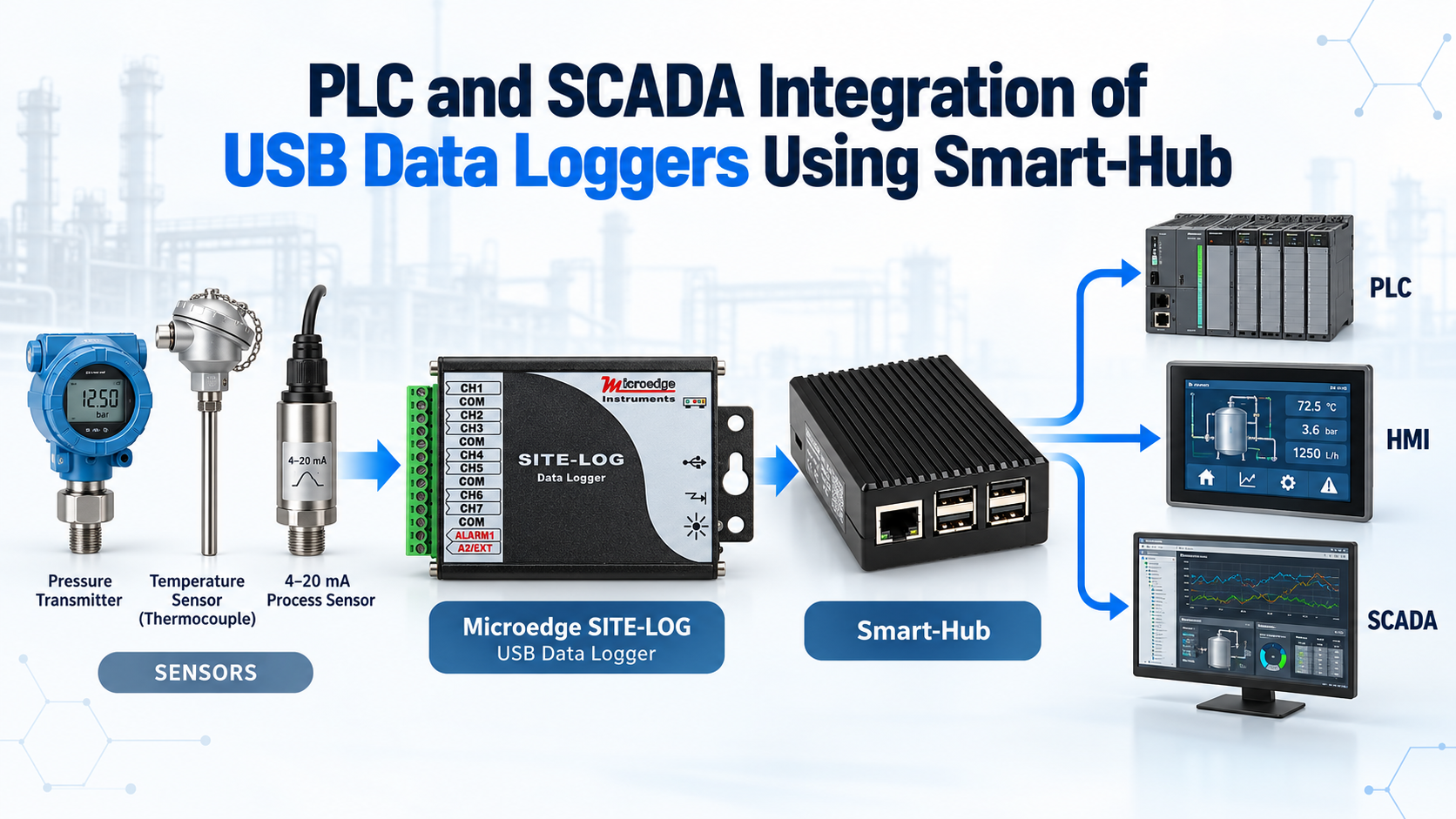
A typical architecture is:
Sensors → USB Data Logger → Smart-Hub → Ethernet → PLC / HMI / SCADA
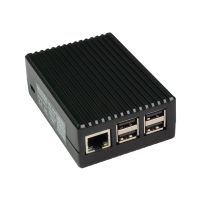
Smart-Hub is a 3-in-1 communication gateway for supported Microedge USB data loggers.
It provides:
For PLC and SCADA integration, the key function is the Modbus TCP Gateway.
Supported data loggers connected to Smart-Hub can be accessed by Modbus TCP masters over the Ethernet network.
The data logger continues performing the actual measurement and data logging, while Smart-Hub provides the network interface between the logger and the industrial control system.
A typical installation may look like this:
Sensors
↓
Microedge USB Data Logger
↓ USB
Smart-Hub
↓ Ethernet
Industrial Network
↓
PLC / HMI / SCADA
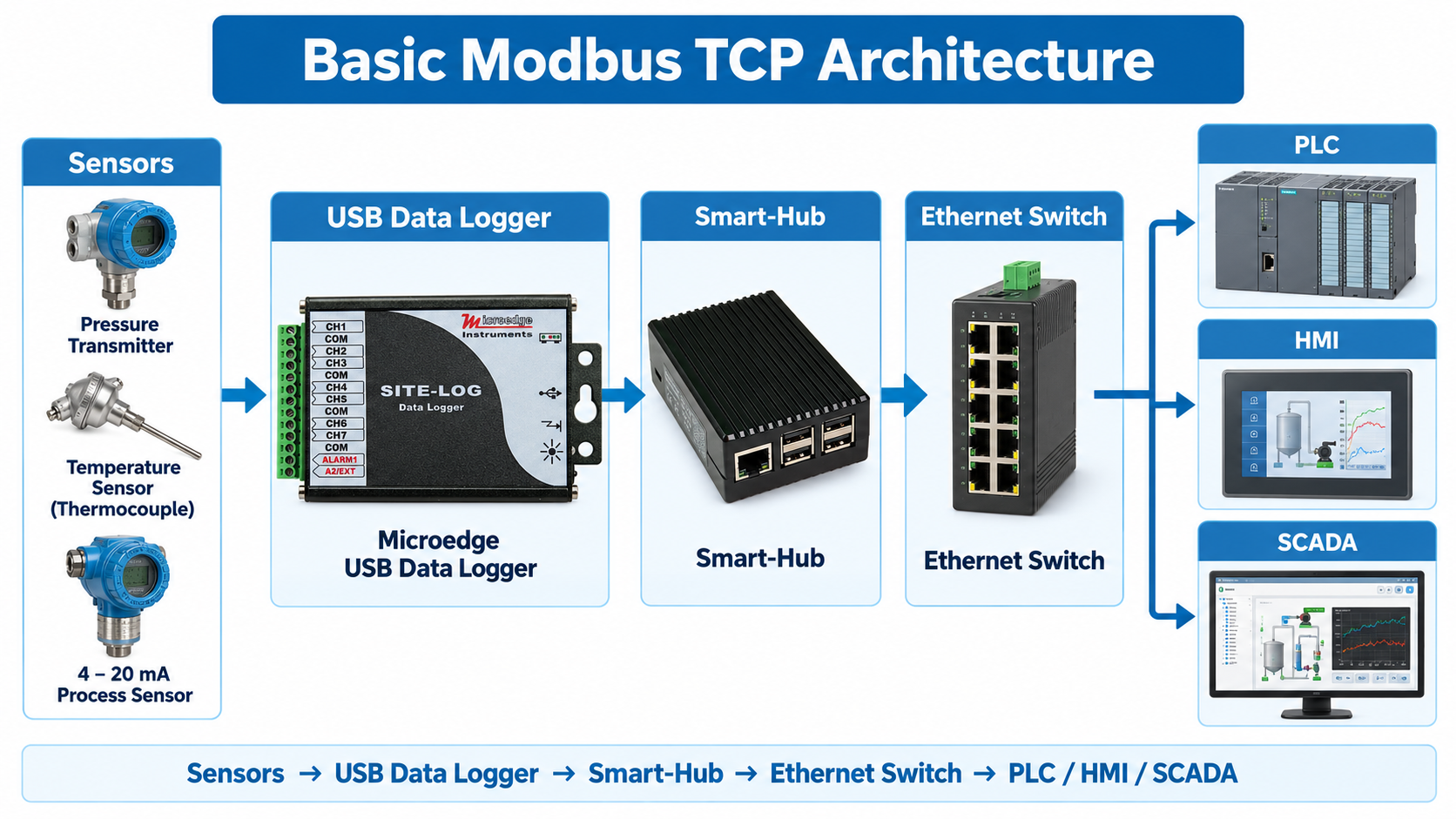
For example:
4–20 mA Pressure Transmitters → LPCB-1 → Smart-Hub → PLC
or:
Thermocouples → LPTM-1 → Smart-Hub → SCADA
or:
Voltage Sensors → PL-V → Smart-Hub → HMI
This allows existing USB-based measurement hardware to become part of a larger automation network.
Smart-Hub makes supported logger measurements available to a Modbus TCP master.
The PLC, HMI, or SCADA system acts as the Modbus TCP client/master and polls Smart-Hub across the Ethernet network.
Real-time logger readings are made available through supported Modbus registers, including Input Registers where applicable.
The communication path is:
PLC / SCADA → Modbus TCP → Smart-Hub → Connected Data Logger
This is useful when the automation system needs live measurement values without implementing Microedge's proprietary logger communication protocol.
Consider a process line with several 4–20 mA transmitters.
The system may include:
These signals can be connected to a Microedge current-input logger such as:
The logger records the measurements locally.
The USB logger is then connected to Smart-Hub:
Transmitters → Data Logger → Smart-Hub → Ethernet → PLC
The PLC can poll the corresponding real-time values through Modbus TCP and use them for:
The logger can simultaneously retain its own recorded data for historical review.
A manufacturing process may require temperature measurements at several locations.
For example:
A thermocouple logger such as LPTM-1 or PL-T can collect these measurements.
The architecture becomes:
Thermocouples → LPTM-1 / PL-T → Smart-Hub → Modbus TCP → PLC / SCADA
The industrial system can display the current temperatures while the data logger independently maintains its own measurement history.
This provides both:
This distinction is important.
The data logger records measurements according to its configured sampling interval.
A PLC or SCADA system may poll Smart-Hub at a different interval.
For example:
The values retrieved through Modbus TCP represent the real-time measurement available to the Modbus interface at the time of polling.
The logger's internal memory contains the measurements stored according to the logger's own sampling schedule.
Therefore:
Modbus TCP data and internally recorded logger data are related, but they are not necessarily identical datasets.
This should be considered when comparing SCADA trends with downloaded logger records.
Smart-Hub provides four dedicated USB ports and can connect up to four supported Microedge data loggers.
A system could therefore include:
Logger 1 — Temperature
Logger 2 — 4–20 mA Current
Logger 3 — Voltage
Logger 4 — Humidity or Other Measurement
All connected loggers can be made accessible through the network.
This can reduce the amount of separate network hardware required in multi-logger installations.
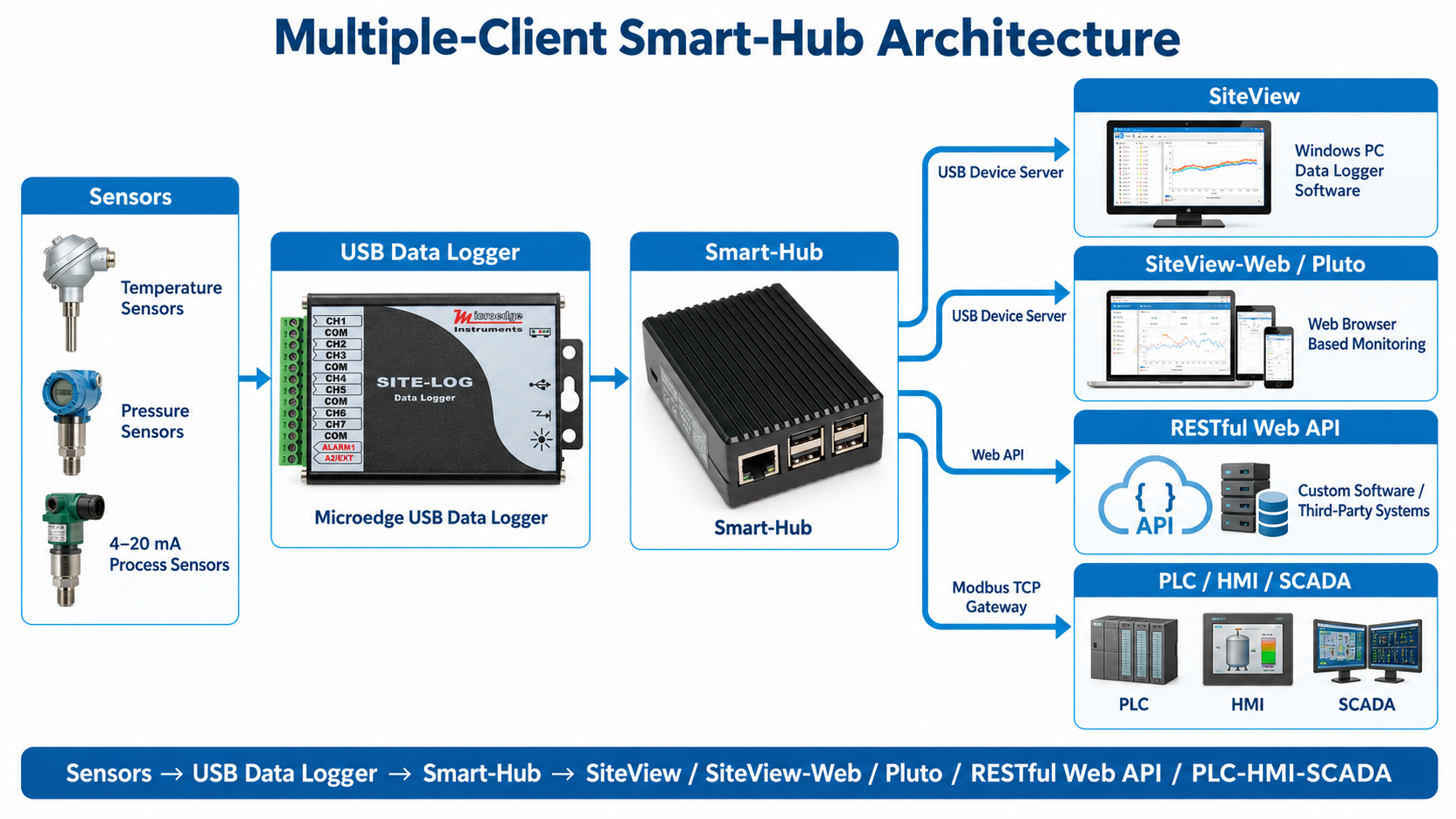
One advantage of Smart-Hub is that a connected data logger can support more than one type of access.
For example:
A typical system may therefore look like:
USB Data Logger → Smart-Hub → Ethernet Network
with separate network clients such as:
This allows the same measurement system to serve both engineering and automation users.
A PLC or SCADA system is typically focused on:
SiteView is focused on:
Using Smart-Hub allows both environments to access the same connected logger without forcing one software platform to replace the other.
Smart-Hub connects to the local network through Ethernet.
Its IP address can be assigned using DHCP.
For industrial installations, it may be preferable to maintain a predictable network address through the network's DHCP reservation or another supported network-management method.
The PLC or SCADA system must be able to communicate with the Smart-Hub IP address over the local network.
Typical architecture:
PLC Network
↕
Industrial Ethernet Switch
↕
Smart-Hub
The network should be configured so only authorized devices can access the measurement system.
Standard Modbus TCP does not inherently provide strong authentication or encryption.
For this reason, Smart-Hub and connected Modbus systems should normally operate on a controlled local network rather than being exposed directly to the public Internet.
Recommended practices include:
The exact cybersecurity architecture should follow the requirements of the facility and control system.
If engineering staff need remote access to the monitoring system, the preferred approach is to provide secure access to the internal network rather than exposing Modbus TCP directly to the Internet.
A typical remote architecture may be:
Remote Engineer
↓
VPN
↓
Facility Network
↓
PLC / SCADA / Smart-Hub
This keeps the industrial measurement network behind the facility's network-security infrastructure.
Smart-Hub can be used with supported USB data loggers from several Microedge product families.
Examples include:
Examples include:
For applications where direct WiFi Modbus TCP is preferred, corresponding PRECISE-LOG WiFi models may be used without Smart-Hub.
| Application | Suggested Configuration |
|---|---|
| PLC reads thermocouple temperatures | LPTM-1 or PL-T + Smart-Hub |
| PLC reads 4–20 mA transmitters | LPCB-1 or PL-C + Smart-Hub |
| Mixed voltage/current process monitoring | LPMB-1 + Smart-Hub |
| SCADA temperature trending | PL-T + Smart-Hub |
| Existing USB logger needs Modbus TCP | USB Logger + Smart-Hub |
| Multiple USB loggers on one Ethernet connection | Up to 4 loggers + Smart-Hub |
| Direct WiFi Modbus integration | PRECISE-LOG WiFi model |
A complete system may look like:
Industrial Sensors
↓
Microedge USB Data Logger
↓ USB
Smart-Hub
↓ Ethernet
Industrial Ethernet Switch
↓
PLC / HMI / SCADA
At the same time:
Smart-Hub → SiteView / SiteView-Web / REST API
This allows the measurement data to be used by both industrial automation systems and Microedge monitoring software.
Smart-Hub provides a practical way to integrate supported Microedge USB data loggers into PLC, HMI, and SCADA systems.
The basic architecture is:
Sensor → USB Data Logger → Smart-Hub → Modbus TCP → PLC / SCADA
The data logger performs the measurement and stores historical data, while Smart-Hub provides the Ethernet and Modbus TCP communication layer.
This allows existing USB-based data loggers to be incorporated into industrial automation networks without replacing the measurement hardware.
For systems that also require browser monitoring, custom software integration, or engineering access, Smart-Hub can simultaneously support Microedge software, RESTful Web API, and Modbus TCP clients.